JUST IN: House Judiciary Committee Releases Jack Smith’s 255-Page Deposition Transcript
J. Scott Applewhite/AP Photo
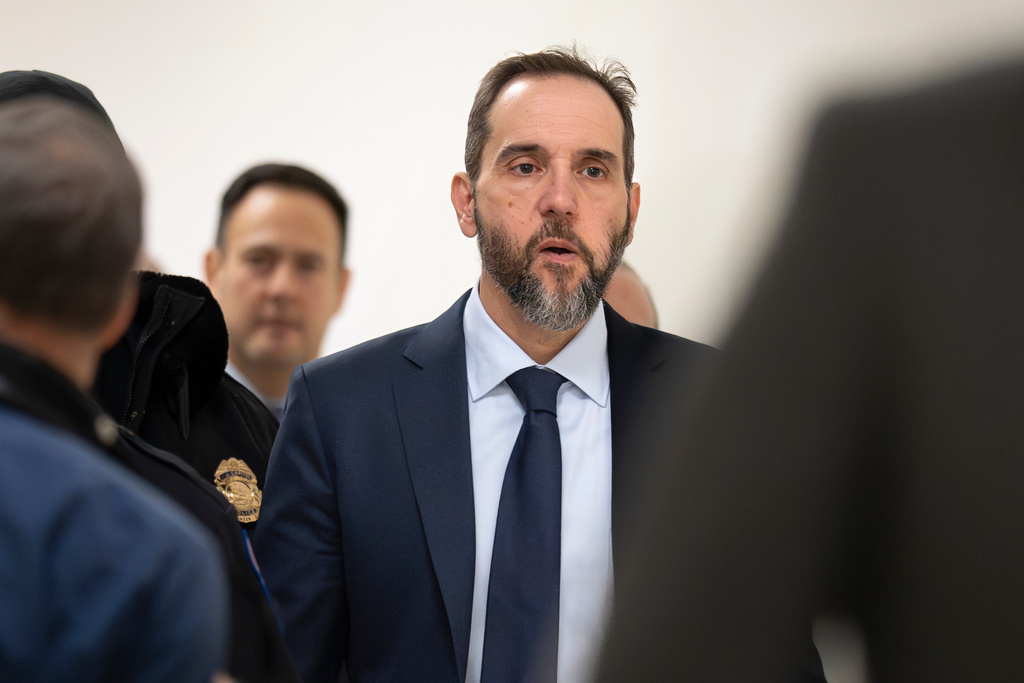
The House Judiciary Committee has released the 255-page transcript of the deposition of former Department of Justice Special Counsel Jack Smith, posting it online with some redactions.
On Dec. 17, Smith testified for nine hours in a closed-door session with the House Judiciary Committee regarding his investigations into President Donald Trump’s efforts to overturn the results of the 2020 election and the retention of classified materials at his residence at Mar-a-Lago. Criminal charges were filed against Trump in both cases but he avoided prosecution due to longstanding DOJ policy against indicting a sitting president.
Smith had repeatedly offered to testify publicly but the GOP-majority committee declined. His legal counsel sent a letter to Judiciary Chairman Jim Jordan (R-OH) on Dec. 24 demanding the “prompt public release” of the “full videotape” of his testimony.
As pointed out by Politico senior legal affairs reporter Kyle Cheney, Smith “was barred from discussing any nonpublic parts of his classified documents probe by Judge [Aileen] Cannon’s order prohibiting DOJ from divulging any nonpublic info about it.”
Smith was barred from discussing any nonpublic parts of his classified documents probe by Judge Cannon's order prohibiting DOJ from divulging any nonpublic info about it. pic.twitter.com/FPytUKzvRt
— Kyle Cheney (@kyledcheney) December 31, 2025
In Smith’s opening statement, as previously reported on by the Associated Press, he declared that his office’s investigation “developed proof beyond a reasonable doubt that President Trump engaged in a criminal scheme to overturn the results of the 2020 election and to prevent the lawful transfer of power” and ” also developed powerful evidence that showed that President Trump willfully retained highly classified documents after he left office in January of 2021, storing them at his social club, including in a ballroom and a bathroom. He then repeatedly tried to obstruct justice to conceal his continued retention of those documents.”
He reiterated that he had been a career prosecutor “[f]or nearly three decades” and had “served during both Republican and Democratic administrations,” making decisions in the investigatory process “without regard to President Trump’s political association, activities, beliefs, or candidacy in the 2024 Presidential election.”
“If asked whether to prosecute a former President based on the same facts today, I would do so regardless of whether that President was a Republican or a Democrat,” he emphasized.
“The decision to bring charges against President Trump was mine, but the basis for those charges rests entirely with President Trump and his actions, as alleged in the indictments returned by grand juries in two different districts,” said Smith. “We took our actions based on the facts and the law, the very lessons I learned early in my career as a prosecutor. We followed Justice Department policies and observed legal requirements.”
Smith also expressed how he was “both saddened and angered” that Trump had “sought revenge against career prosecutors, FBI agents, and support staff simply for doing their jobs and for having worked on those cases,” adding “[t]hese dedicated public servants are the best of us, and they have been wrongly vilified and improperly dismissed from their jobs.”
Trump’s tweet at 2:24 pm on January 6, 2021 “without question…endangered the life of his own Vice President,” Mike Pence, Smith testified, highlighting how Trump had “refused to stop” the attack on the Capitol and was “pushed repeatedly” by his staff to do something to “quell” the violence.
Smith says Trump "without question" added to the danger to Mike Pence's life with his 2:24pm tweet while the Capitol was under attack. pic.twitter.com/F0escKbgzr
— Kyle Cheney (@kyledcheney) December 31, 2025
Smith vociferously denounced Trump’s efforts to politicize the DOJ, specifically the firing of prosecutors who worked on the cases against the Jan. 6 rioters or other investigations into Trump and his allies as “contrary to the rule of law” and “contrary to who we are as a country,” explaining the historical precedent warning against returning to such a “patronage” system:
If you take the position that you cannot work in the Federal Government unless you have a political allegiance to the President, I think there are many harms to that. Our country tried that in the past. It’s called the patronage system, and what we learned in our history — and this would be if it’s a Democrat or Republican. It would not matter.
But what we learned is that those systems are rife with not only corruption, but with incompetence, because the people who have these jobs, they didn’t get them because of merit, because they dedicated their career to learning national security law, to learning how to properly investigate a case. They got their jobs because they’re loyal to a particular person. That’s not fair, but it also makes for people who really don’t know how to do the work.
So I think that’s a danger to the country. It saddens and angers me in the short-term, but I think there are great costs to us long-term if that’s the direction we’re going…
I’ve just seen career prosecutors who have served, again, Republican and Democratic administrations over and over again. These are the knowledge sources in the Department in different areas. These are the people who mentor young lawyers, and when you take them away, those young lawyers don’t have anybody to learn from. My experience in the Department, again, it doesn’t matter the administration. These are not partisans. They’re people who have decided they don’t want to make a lot of money. They’re not looking for fame. They just want to do good work, and I think when you lose that culture, you lose a lot.
Read Smith’s deposition transcript here.
This article has been updated with additional information.
The post JUST IN: House Judiciary Committee Releases Jack Smith’s 255-Page Deposition Transcript first appeared on Mediaite.
from Mediaite https://ift.tt/gv4OSWs

 (@andrii_sybiha)

 (@joyxvalentine)